


Frequently Asked Questions
Please review all of our Frequently Asked Questions below. If you have a question and do not see the answer, please Contact Us and a member of our team will be in touch shortly.
1. Ordering, Stock, Lead Times, Quotes & Distributors
How Can I Verify if a Specific Part Number is in Stock?
There are two ways to determine if a specific part number is in stock:
1. Navigate to the Part Number Landing PageType in the part number in question using the search bar in the main navigation bar. The intelligent search will bring up all possible matches. Once you click through, the product landing page will display available inventory and inventory levels at various distribution partners.

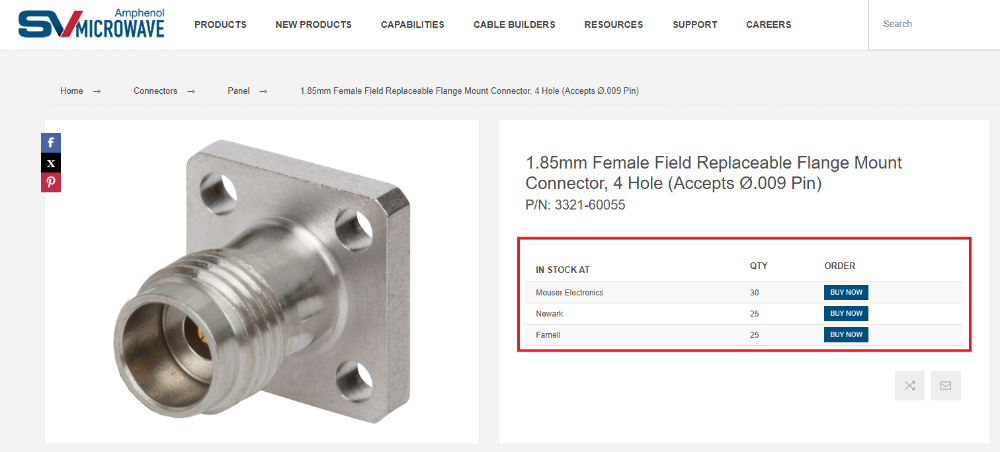
Sometimes, though rarely, the search bar will not return the desired result for an intended part number. This typically results when searching for a legacy part number. This part number might not be actively supported on the website, but it still has available inventory in the distribution channel. To look for available inventory, use the Check Inventory button.
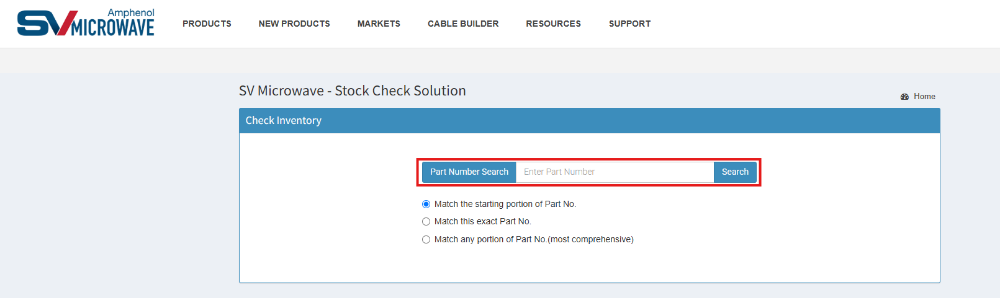
2. The Check Inventory ButtonThe Check Inventory button is on the website's top navigation bar, next to the “My Account” button. Clicking this button will take you off SV Microwave’s website and bring you to a third-party service that aggregates all available inventory in the distribution channel by part number.
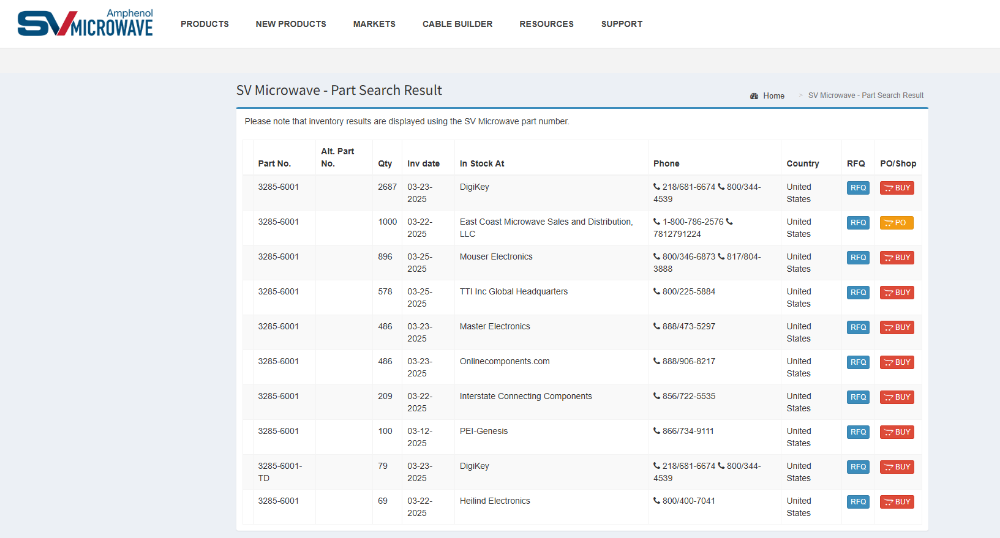
Enter the part number in question into the Part Number Search, and similarly to a Product Display Landing Page, all available distribution channel inventory will be shown.

What is the Lead Time for a Specific Part Number?
Lead times are competitive if you want to procure a COTS part number through distribution. High-service distributors like Mouser, DigiKey, and Newark can ship immediately if a part number is in stock.
If a part number is not in stock or requires customization, lead time can vary depending on the product type and complexity of the customization. Typically, lead times range between 8 and 16 weeks.
Do you offer Expedited Shipping Options for Urgent Orders?
There are various shipping methods and in-hand dates when ordering a COTS part number through distribution. Choose the configuration that best suits you to receive your order quickly.
However, when placing an order directly with SV Microwave for a customized part number or when there is no available inventory, check with your Account Manager to discuss expedited shipping options. Please note that while shipping options have some flexibility, expediting manufacturing lead times is more complicated.
Can I get a Price Quote for a Specific Part Number?
Yes, SV can quote any of our active COTS or custom part numbers. For a detailed quote, please contact your SV Account Manager or email us at sales@svmicro.com.
Do you offer Volume Discounts or Special Pricing for Large Orders?
Yes, purchasing in larger quantities or higher volumes can help reduce costs due to economies of scale. The exact pricing varies based on part number and can be discussed with your Account Manager.
How Do I Find a Distributor?
After searching for the part number you are looking for, all distributors with available inventory will be visible on the product's landing page along with the quantity and option to buy.
You can also see a listing of all of our distributors on our Distributors page.
How Can I Verify if a Part Number is Active or Obsolete (EOL), or Find a Replacement?
If a part number does not appear in our website search bar, it is not necessarily obsolete. Many OEM-specific, military/DLA, or custom source-control part numbers are active and built-to-order, even if they are not displayed in our public COTS catalog.
To verify the production lifecycle status of a part, request a Product Change Notice (PCN), or find a form-fit-function replacement for an obsolete item, please submit the part number through our Contact Us form or email sales@svmicro.com.
How Can I Check an Existing Order Status, Request an Invoice, or Set Up Tax-Exempt Purchasing?
Online & Rapid Response Orders: To check the shipping status of a website order, request a copy of an invoice, or apply a Tax-Exempt or Resale Certificate to your online account prior to placing an order, please email sales@svmicro.com with your order number or account email address.
Website Login & Password Reset Assistance: If you do not receive a password reset email when trying to log in to download CAD or HFSS models, please check your corporate spam filter or contact us so our team can verify and activate your account.
2. Datasheets, CAD/HFSS Models, Footprints & Product Resources
Where Can I Find the Datasheet for A Specific Part Number?
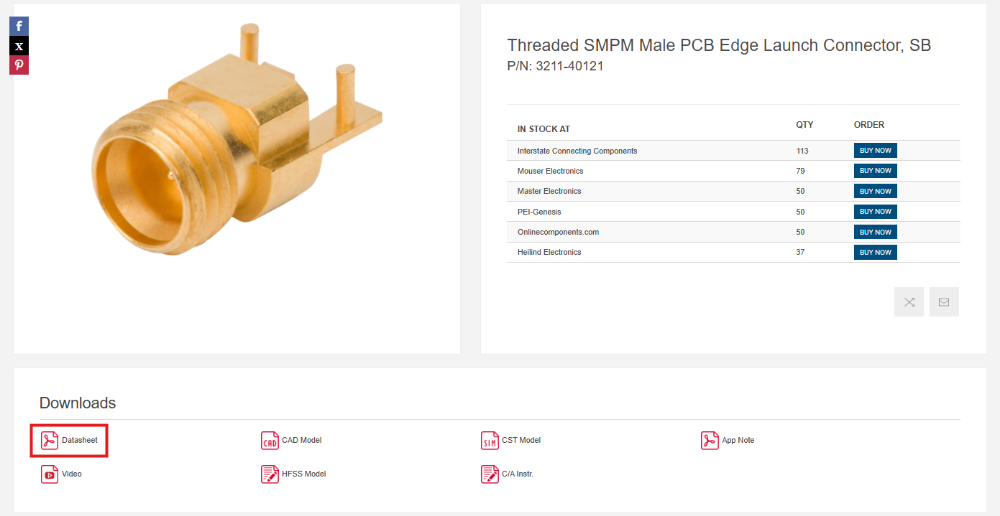
SV Microwave has a Product Datasheet, or Product Data Drawing, for all our COTS products. These datasheets are all available on our website and are displayed on the Product Display landing page for each part number. After navigating to a specific part number, scroll down to the “Resources” section of the page. In this section, you’ll find a variety of attachments associated with that part number. The first attachment, Datasheet, will download a PDF of the Datasheet to your local drive.
If you need a Datasheet for a custom product, contact your Account Manager or email sales@svmicro.com and request it.
How Do I Download Ansys HFSS Models or S-Parameter (.s2p) Files? Why Am I Getting an Error Opening an HFSS Model in Ansys 2024 or Newer?
Where to Find Simulation Models: For many active COTS PCB and cable connectors, encrypted 3D Ansys HFSS models (.a3dcomp) and S-Parameter Touchstone files (.s2p) are available on the product landing page under the Resources or Request Model section.
Ansys HFSS 2024 R1/R2+ Compatibility (ACIS vs. Parasolid Error): If you encounter a geometry or import error when opening a downloaded .a3dcomp file in Ansys HFSS 2024 R1, 2024 R2, or newer, this occurs because newer releases of Ansys HFSS transitioned from the legacy ACIS geometry kernel to Parasolid. Please submit a request through our Contact Us form or email applications@svmicro.com with the part number and your Ansys HFSS version, and our Application Engineers will provide an updated Parasolid-compatible model or .s2p data file.
Where Can I Find Recommended PCB Footprints, Land Patterns, and Board Layout Details?
Datasheet & Resources Section: For standard PCB connectors (Edge Launch, Surface Mount, Thru-Hole, and Solderless Compression Mount / LiteTouch), recommended PCB mounting footprints, signal trace widths, and mounting hole layouts are provided either on Page 2 of the Product Datasheet or as a separate PCB Footprint / Mounting Drawing in the Resources section of the part’s landing page.
Custom Stackups & Optimization: Because high-frequency RF performance (up to 110 GHz) depends on your specific board dielectric material, stackup thickness, and transmission line configuration (Grounded Coplanar Waveguide [GCPW], Microstrip, or Stripline), our Application Engineering team can provide tailored footprint recommendations or simulation support. You can request a footprint directly on the product page or email applications@svmicro.com.
Where Can I Download 3D CAD Models (.STEP / .STP)?
COTS Products: 3D .STEP models are available for download directly on the product landing page under the Resources section. Please note that you must be logged into your SV Microwave website account to download CAD files.
Rapid Response & Custom Cable Assemblies: If you require a 3D .STEP model or a 2D customer drawing for a configured Rapid Response cable assembly or a non-web part number, please contact sales@svmicro.com or applications@svmicro.com with the part number.
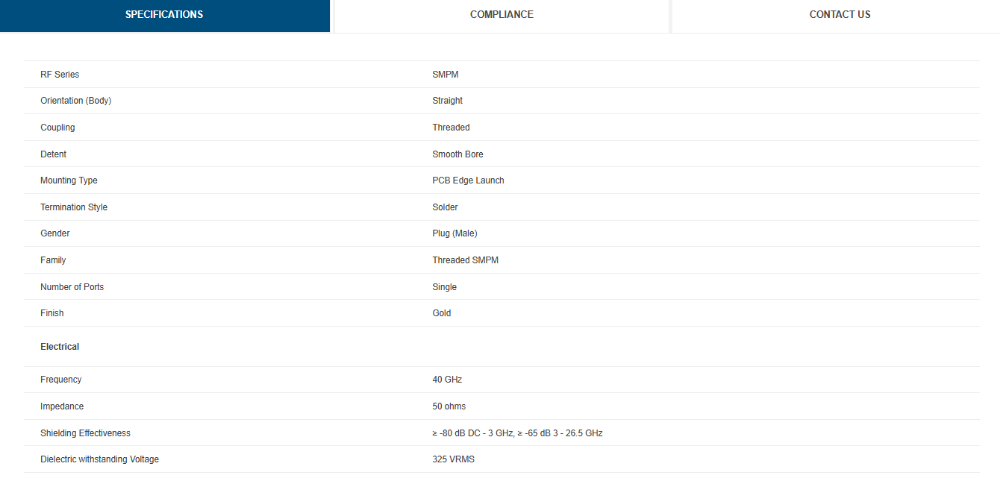
What Are the Mechanical and Electrical Specifications for a Specific Part Number?
SV Microwave provides electrical, mechanical, and environmental specifications for our COTS part numbers. Upon navigating to a specific part number landing page, this information is readily available towards the bottom, underneath the product resources section.
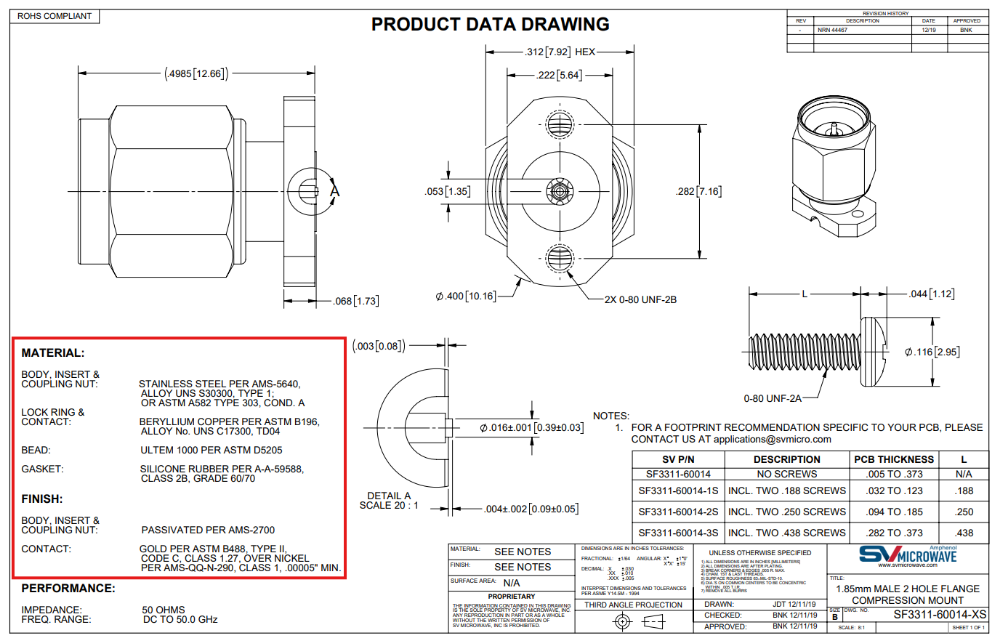
How can I Discover what Materials are used in a Specific Part Number, and how does it Impact Performance?
SV Microwave’s COTS product offering lists the materials used in the product datasheet. The materials are divided into different categories:
- Body, insert and Coupling Nut
- Lock Ring & Contact
- Gasket
- Finish
- Etc.
Where Can I Get Cable Assembly Instructions?
All of our parts' cable assembly instructions can be found on that part's landing page on our website, if one exists. For non-website parts, please contact us.
Where Can I Easily Cross Reference Similar Part Numbers With SV Part Numbers?
Where Can I Find More Information on New Products?
Our New Products page displays all of our new and featured parts. You can also get access to more detailed information through one of our many Application Notes.
Where Can I See Demonstrations of Your New Products?
Our Videos page is continuously updated with videos showing users the process of assembling/disassembling and close-up movements of our new products.
3. RF Compatibility, Performance & Custom Solutions
How Do I Know if a Part Number Is Compatible with a Specific RF Series or Connector Type? How do I know if two products can Inter-mate?
SV’s part numbers follow a naming convention whereby the part number indicates the RF series, gender, and product orientation. Within the same RF series, any male connector will mate to any female connector, with a few rare exceptions.
What Do the Suffixes and Detent Codes in SV Microwave Part Numbers Mean (FD, LD, SB, -TD, -1S, -2S)?
Push-On Detent Types (SMP, SMPM, SMPS):
- FD (Full Detent): Provides the highest retention force (positive locking) and requires the highest engagement and disengagement force. It is typically used on the fixed or PCB side of a mated pair.
- LD (Limited Detent): Provides medium retention force, balanced for frequent mating and unmating cycles.
- SB (Smooth Bore / Catcher’s Mitt): Provides the lowest engagement and disengagement force and accommodates axial and radial misalignment. In blind-mate board-to-board systems using a spring bullet adapter, one side typically uses FD (to retain the bullet) and the mating side uses SB (to guide the bullet during blind mating).
Common Part Number Suffixes:
-TD(Pre-Tinned): Indicates that the connector’s solderable leads and surfaces are pre-tinned with Tin-Lead (SnPb) solder to facilitate PCB assembly. It is functionally and dimensionally interchangeable with the base part number.-1S/-2S(Mounting Screw Lengths): Indicates the length of the mounting screws included with Solderless Compression Mount and LiteTouch PCB connectors to accommodate different PCB thicknesses (for example, 4.76 mm vs. 6.35 mm screws).
How do I Know if a Part Number can be used in a Specific Application, E.G., Space, Aerospace, Military, Or High-Frequency Systems?
Most of SV’s COTS products are used within each of these markets: Space, Aerospace, Military, or High-Frequency systems. Within each vertical, there may be additional considerations. For example, search for a product constructed with gold or stainless steel plating or BeCU in Harsh Environment applications. For Space, be aware of outgassing exceptions on non-metal components.
Are Your Connectors Interchangeable with Other Brands’ Connectors?
RF connectors, adapters, and cable assemblies from different manufacturers are interchangeable if they share an RF series (for example, SMA, 2.4mm, SMP, SMPM, SMPS, etc.). Military or industry standards-producing organizations control the critical interfacing dimensions—these are not determined by the OEM. SV Microwave is an active contributor to several of these organizations, most notably in the VITA and SOSA markets.
Do You Offer Guidance on Selecting the Right RF Connector for My Application?
Yes, SV Microwave has a team of Application Engineers who have the technical knowledge to help answer any design application questions you may have. You can contact our Application Engineers by submitting a Contact Us form on the website, or by emailing applications@svmicro.com.
Are your Products rated for High-frequency Applications?
Yes, SV Microwave specializes in high-frequency RF interconnect solutions. All our adapters, connectors, and cable assemblies are rated for high-frequency RF solutions ranging from 2 GHz to 110 GHz. Though the frequency of a specific part number can be affected by several factors, the guide below provides frequency ranges that are typical of each RF Series.
| RF Series | Frequency |
|---|---|
| SMA | 18 – 26.5 GHz |
| 2.92mm | 40 GHz |
| 2.4mm | 50 GHz |
| 1.85mm | 65 GHz |
| 1.00mm | 110 GHz |
| SMP | 40 GHz |
| SMPM | 65 GHz |
| SMPS | 65 GHz |
| BZ | 2 – 18 GHz |
| BMMA | 28 GHz |
| BMB | 22 GHz |
| BMA | 22 GHz |
| BMZ | 18 GHz |
| Type N | 11 GHz |
| PN | 18 GHz |
| TNC | 11 GHz |
| PTNC | 15 – 18 GHz |
| ZMA | 3 – 18 GHz |
What is the Minimum Bend Radius for your Cable Assemblies?
The minimum bend radius of a cable assembly is determined by the type of cable utilized. Below are eight different types of cable that we typically use in our COTS cable assemblies. For these, the bend radius ranges from .600” to .0625” for our SuperFlex cable assembly product line.
| Cable | PN | Min Bend |
|---|---|---|
| .140 Flex | 200-70-140 | .500” |
| .087LL | 200-70-363 | .125” |
| .085 Flex | 200-70-139 | .250” |
| .086 Conformable | 200-70-047 | .250” |
| .047 SuperFlex | 200-70-391 | .0625” |
| .047 Flex | 200-70-479 | .100” |
| .047 Conformable | 200-70-358 | .125” |
| RG179 | 200-70-118 | .600” |
What Are the Recommended Mating Torque Specifications for SV Microwave Threaded Connectors?
Unless otherwise specified on the individual product drawing, standard recommended mating torque values for threaded RF connector series are:
- SMA / 2.92mm / 2.4mm / 1.85mm: 7 to 10 in-lbs (Stainless Steel) | 3 to 5 in-lbs (Brass)
- 1.00mm: 4 in-lbs
- Type N / TNC / PTNC: 12 to 15 in-lbs
- SMPM-T (Threaded SMPM): 2.0 to 2.5 in-lbs
For panel-mount hex nut torque or 2-hole and 4-hole PCB mounting screw torque (0-80 UNF), please refer to the specific product datasheet or contact applications@svmicro.com.
What Tools Are Required to Insert or Remove VITA 67 (SMPM / SMPS / Nano RF) and D38999 Coax Contacts?
Snap-in VITA 67.1, 67.2, and 67.3 backplane contacts and MIL-DTL-38999 Size 8, 12, and 16 coaxial contacts require dedicated insertion and removal/extraction tools to prevent damage to the retention clip or cable assembly.
Tool part numbers (such as the 500-32-XXX series for SMPM VITA 67.3 contacts) are listed on the respective contact or cable assembly datasheet and under our Tools & Accessories category. Always use the specified removal tool rather than pulling directly on the coaxial cable.
Can you manufacture a custom connector or cable assembly for my application?
Yes, SV’s COTS product offering represents only a small portion of SV’s complete product line. Our team is adept at modifying and customizing our COTS offering or creating a completely custom solution based on your needs. Contact Us or email us directly at applications@svmicro.com to get started.
Additionally, SV Microwave offers a custom cable assembly configurator, Rapid Response, which allows you to configure any single-port cable assembly across a variety of cable connectors and cable types. Choose a cable connector from 10 different RF series and select from one of four different cable types. Rapid Response is easily configurable to allow phase delay matching and custom lengths as well.
Are there Additional Costs for Custom Modifications or Non-standard Configurations?
While customizations do not have set built-in fees, any modification to a standard COTS item may result in additional costs and an increase in the price.
Our Application Engineers are highly familiar with our COTS offerings and may be able to suggest a standard product that can accomplish your goal and maintain a competitive price. Email applications@svmicro.com to discuss alternate options.
Can I request a Prototype for Testing before Committing to a Large Order?
Depending on your specific need, our team may be able to accommodate this request, especially if the prototype is a readily available item in distribution.
Contact Us or email us directly at applications@svmicro.com to learn more.
How long does it take to Develop and Deliver a Custom RF Solution?
The timing for a custom RF solution depends on several different factors. SV’s custom products generally have a lead time of 8-16 weeks.
4. Compliance, Tariffs, CAGE Codes & Careers
How Do I Obtain Compliance Documents (RoHS, REACH, CMRT) or Export and Trade Data (ECCN, ITAR, HTS)?
Global Compliance Center: Please visit our Global Compliance Center for comprehensive details on SV Microwave’s quality certifications, environmental initiatives, and regulatory compliance programs, including RoHS, REACH, Conflict Minerals (CMRT), and ISO/AS9100 quality standards. Part-specific RoHS and REACH statuses are also available on individual COTS product landing pages under the Resources and Specifications sections.
Export Classifications & Part-Specific Certificates: If you require part-specific U.S. Export Control classifications (EAR99 / ECCN vs. ITAR / USML), Harmonized Tariff Schedule (HTS / Schedule B) codes, TSCA/PFAS declarations, Certificates of Conformance (CoC), or shelf-life documentation, please review our Global Compliance Center or email sales@svmicro.com with your part number(s).
What is Your CAGE Code?
West Palm Beach, FL: 95077
Mesa, AZ: 8D6M2
How Are SV Microwave Products Impacted by International Tariffs, Particularly Those Involving China?
SV Microwave products face minimal exposure to international tariffs, including those related to Chinese imports. We engineer and manufacture our interconnect solutions primarily within the United States, with manufacturing operations located in West Palm Beach, Florida (CAGE Code: 95077) and Mesa, Arizona (CAGE Code: 8D6M2). As a result, our customers benefit from reduced tariff-related risks, greater supply chain stability, and faster lead times compared to other interconnect suppliers.
Where Can I Apply for a Position?
You can search for and apply for all open positions on our Careers page or fill out our Apply for a Position form. Our human resource manager will be in contact with you shortly!